One change, start to finish
Audience: project users. Read this after What is Change Loop? and before installing: it shows what a change feels like, so the setup steps make sense.
A change moves through five steps. Most of the work belongs to your coding agent and the harness; you appear at three moments: approving the agreement, reviewing the result, and authorizing Land.
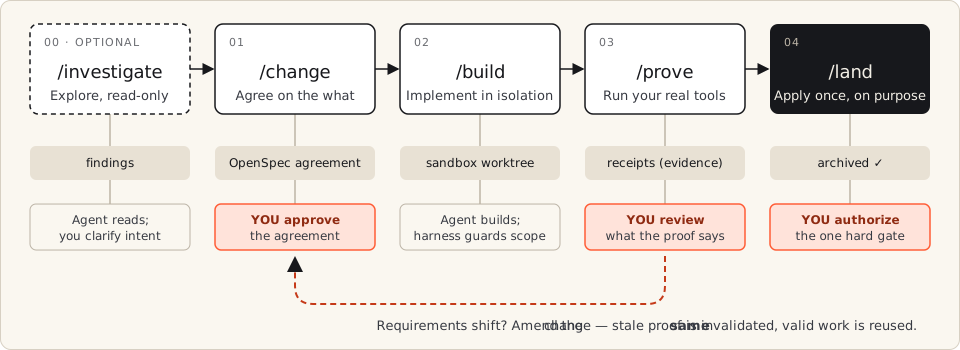
Who does what, step by step
Section titled “Who does what, step by step”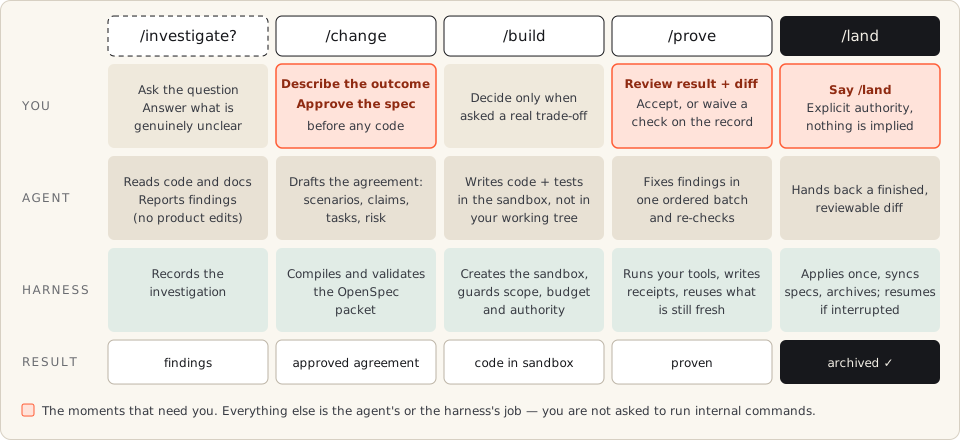
The orange cells are your whole job. The agent writes and repairs; the harness isolates, runs your project’s tools, records evidence, and applies the result.
A worked example
Section titled “A worked example”Goal: let an account owner edit their display name. Every line below is something you type or something you see; the commands in between are the agent’s.
| # | You | What happens | What you see |
|---|---|---|---|
| 1 | /change allow an account owner to edit their display name |
The agent studies the existing behavior and drafts an agreement; the harness compiles and validates it | An approval question with a readable package: scope, scenarios, risk, and how the result will be checked |
| 2 | Read the scenarios. Fix what is wrong (“names may contain emoji”). Approve. | The agent amends the draft; nothing is built yet | The same change ID, with the correction carried into the agreement |
| 3 | /build <change-id> |
The agent writes code and tests in an isolated workspace; the harness guards scope and budget | Progress, and a question only when a real trade-off needs you |
| 4 | Nothing (Build continues into Prove) | The harness runs your tests, linters, and browser checks, stores a receipt per claim, and reruns only what an edit invalidated | A summary: passed, failed, or could not be checked — which is never a pass |
| 5 | Review the summary and the diff | The agent repairs findings in one ordered batch | State proven — ready, but not delivered |
| 6 | /land <change-id> |
The harness applies the proven work once, syncs specs, archives, and cleans up | State archived: the diff is in your project, uncommitted |
You then commit, push, or open a PR through your normal process, or use the
optional /deliver with its own explicit authority.
Other situations you will meet
Section titled “Other situations you will meet”| Situation | What to do | Why it is safe |
|---|---|---|
| You do not yet know the cause or the right behavior | Start with /investigate <question> |
Read-only; findings feed the later /change |
| The requirement shifts mid-build | Tell the agent; keep the same change ID | It amends the agreement and invalidates only the proof that went stale |
| A check cannot pass | Read the options the agent lists: more work, pause, or waive | A waiver is a recorded decision; it never turns a failure into a pass |
| The session or Land was interrupted | Ask the agent to resume; /changes shows where each change stands |
State lives in files, not in the chat. Do not recreate the change or edit runtime records |
| The work spans several repositories | Declare scope first — see multi-repository | One change, one proof, one Land across the repositories |
Where to go next
Section titled “Where to go next”- Install — a few minutes, once per project.
- Quickstart — run this exact flow on your own project.
- Your decisions — what you approve, and what you can safely leave to the agent.